
Right now there's not a good way I've found to "manage" your filters. I assume you're probably working on it already or it's on your list of things to do.
Currently I am able to do almost everything I would like to do with the filters, but it is not intuitive. I am able to create and save a new filter by first clicking "Customize" and then setting up a new filter. After executing the filter it shows in the "Recent History" at the bottom of the filter list. From there, I can "Edit" the most recent filter, and then it allows me to give it a name and it saves it in my list. Here's a list of my requested changes 😃 Requested Changes to Filter Management
- Allow reordering of filters
- Maybe drag/drop move them up/down the list of filters?
- Give option to change the Icon for the filters
- Allow sharing of filters between team members
- Also option to manage filters that are "default" by project
I'm sure I'm missing some obvious ones, but those would be useful.
Dear Crystal, maybe like this would be best:
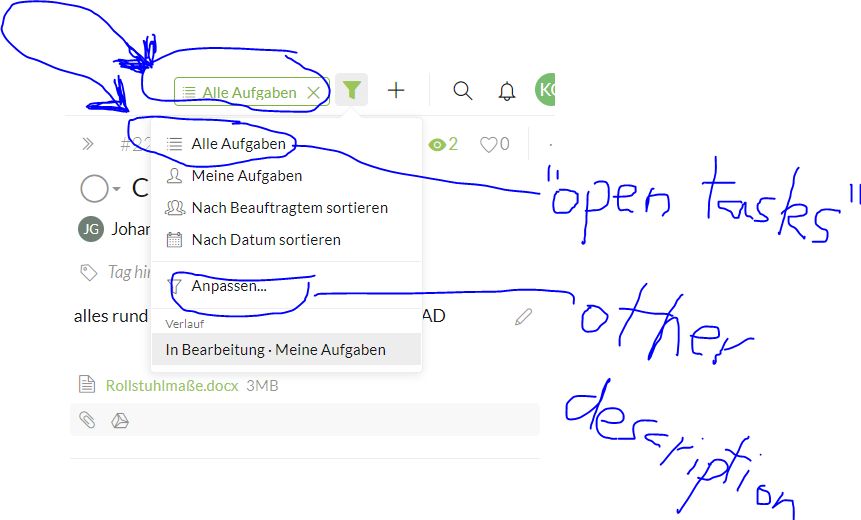
1.) if the filter is set on "all tasks" already, then in the menue the choice offered needs to change into "open tasks only" or so. I know the "x" button in the applied filter signs - that is good, but when you are used to use the menue, then you need to be able to choose that option there and then it needs to be named in the right way.
2.) Maybe it is not necessary to make the filter menue all that new as I mentioned before, if you have one option fast filters on the first section of the menue and after the line the option to create more complex filters as you have right now. But then you want to rethink the name of that button. Now in german it means "adapt". I think it was easier to understand to name it "individual filters" or "complex filters" or "multi filters" or so.
Greetings and bring back "my tasks" soon...
Quire_Karlheinz Gerster, Jul 5, 2017
Thanks for splitting those out into subtasks
Brian Mortus, Jul 10, 2017
Hi Brian, You are welcome. 😃
Crystal, Jul 11, 2017
Hi Brian, Thank you for chiming back in and gathering everyone's suggestions into your list. 😃 I have just added subtasks under this task, so feel free to discuss each of the items there. Do let me know if I missed any. Thanks!
Crystal, Jul 10, 2017
Hi Karlheinz, Thank you for the explanation and screenshot. We will think further about it, and most certainly try to find a way to make setting filter easier, more intuitive. And yes, My Tasks will be back soon. 😃
Crystal, Jul 5, 2017
Hi Karlheinz, You meant that to see for example all completed tasks, it takes several clicks, but you would like to do so without the “level” of Customize? That is, when you click on the filter icon, you want to be able to select “Completed Tasks” right away? Perhaps a mockup screenshot could give us a better picture. 😃 As for the issue, you can simply click on the “X” to clear the filter, and return to the default “Incomplete Tasks” filter. Does it help solve the issue?
Crystal, Jul 5, 2017
Sorry I haven't chimed back in for a while on this one. I'm still working on learning the "markdown" I'd like to do a hierarchical list within the comment but haven't figure that out yet- and that's a different issue completely.
Anyway- I think that Improve Filter Management is a project in and of itself which would include quite a few subtasks. I think things tend to get confused without breaking them down that way (which is why I love quire so much).
I think every one has mentioned great ideas about filtering, but ultimately they're all different development tasks for you folks at quire.
I'm going to update my initial list and add in the notes from @karlheinz.gerster and @i.meisen .
- Allow reordering of filters
- Maybe drag/drop move them up/down the list of filters?
- Give option to change the Icon for the filters
- Allow sharing of filters between team members
- Also option to manage filters that are "default" by project
- @i.meisen mentioned that you cannot add multiple criteria to a filter or exclude based on a filter in #479 to which you responded that you have this in the works already- which is great
- I believe that @karlheinz.gerster was mentioning the same concern as @i.meisen just providing a different approach to building a complex filter
@crystal You asked a couple questions related to a few that I added in the initial list and I'd love to respond to each of them separately.
Is it possible to add each of these items all as subtasks under #481 so we can discuss each separately?
Brian Mortus, Jul 6, 2017
🙌
Quire_Karlheinz Gerster, Jul 5, 2017
Hi Brian, Thank you for all the suggestions. 😃 About reordering (eg. via drag & drop), I assume you would like to order the filters alphabetically? And by "sharing" filters between team members, how about simply copy the URL of the project that is filtered, and send it to your team members? As for an option to manage default filters per project, you can click on the "pen" icon to rename/remove them. Is this what you have in mind?
Crystal, Jul 3, 2017
Hi there, I too suggest to make the filter organisations easier as they used to be. Now it feels a little like "Microsoft" (puh) because there is plenty of place in the window, but I need to make an additional click to manage the filter preference if I want to see also the already finished tasks. A great thing about Quire is that you don't let pop up a new window everywhere, but can edit things on the same "level". Please stick to that and show all options, so it becomes a one click task again.
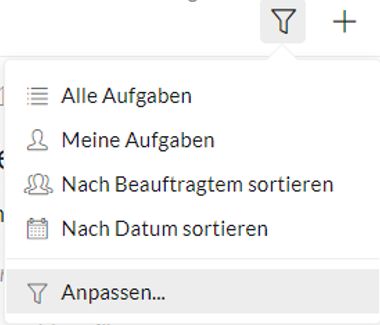
You might choose the way to do this by having categories like the appointee and when you place the mouse over it the window widens to offer all the colleagues to choose from, but without another click and window.
Here is another issue about it:
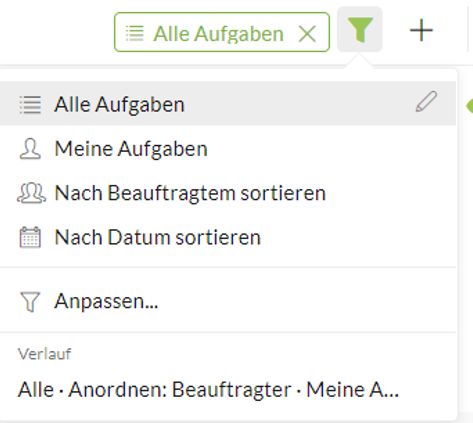
all tasks is already the filter, but by clicking the filter button, I can choose that option again. It should change then to "only open tasks" or so.
Quire_Karlheinz Gerster, Jul 4, 2017
ok - you can already set priorities, but one would need to get faster access to them at a glance. So you might offer the opportunity in "options" to create personal categories in the left column. Then you had not only "projects" or "my tasks", but named buttons to click on which then apply a personal filter individually designed. For example you would like to get shown all priorities of all projects. Then you would just hit the bottom and get instant access. But by letting it open for individual design, then everybody could build it as he needs it in his special case or depending on his personal preferences as you never could do so.
Quire_Karlheinz Gerster, Jul 19, 2017