
Hi,
I keep loving Quire :-) For intuitive and on-the-fly reviewing of lists, is there any way to...
- EXPAND ALL items in all my lists? (to the deepest level)
- COLLAPSE ALL items, so only the "top-level lists" are visible
- Expand 1st level - so the top-level lists and their immediate children are visible.
- SAVE VIEW(s), like "Shopping list", so that the app opens "House ->Maintenance -> Shopping List" with one click, instead of expanding and scrolling many times? OR, allow a TAG CLOUD, so that I can assign "shopping" and "home", to any given item :-) This is more advanced, I know.
THANKS !!!!!!!!!!!!!!!!!
Alex UX consulting at its finest :-) www.AlexRendar.com
Hi Alex, Yes it is possible. You can right-click on the “expand/collapse” icon of a task, and then select which level you want to see tasks up to.
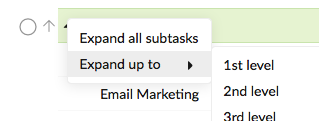
Crystal, Mar 6, 2018
Hi Peggy, tks, this will save me a lot of time!
Stephane Waha, May 20, 2019
Hi Stephane, You could press Shift+left arrow key to collapse. Keep pressing until the tasks are collapsed to the first level. Vice versa: Shift+right key expands the tasks. Hope this helps. You could also see here for more information: #{Getting_Started_with_Quire/127} Collapse or expan... Thanks. 👍
Peggy, May 10, 2019
Hi Crystal, that's a great feature, I didn't know it was there. And that's exactly the big problem - this type of hidden functionality is hard to find, and easy to forget. Users don't know where they can right-click. What if you could SHIFT+RightClick or Alt+DoubleClick?
For better usability, I recommend duplicating any hidden functionality like that by adding a toolbar button or a link, or some other method of discovering it more intuitively. Otherwise, you're not letting everyone else take advantage of some great features because they're hiding behind the right-click.
💪 😃
Alexander Rendar, Mar 7, 2018
⭐️ We have closed your thread in order to optimize the performance of the Quire Feedback Forum. Please see our Quire Feedback Official Guideline for more information.
Peggy, Apr 28, 2021
Wayne Villars, Dec 18, 2018
Thanks for making me discover this hidden feature really useful! I would like to have the possibility to collapse all tasks of one project to the first level. It would help me navigate more easily after drilling down into a task. Also get back to a broder view of my project. Is this possible? Tkx
Stephane Waha, May 9, 2019