
If a task has a description, it is decorated with a tiny gray link at the end. If we select a task, we can see the description in the right panel. If this description contains links, we can click and open them. I suggest the following improvement: if a task's description has links, make the "description" icon look a bit different and clickable. Clicking would open the first link from description.
⭐️ We have closed your thread in order to optimize the performance of the Quire Feedback Forum. Please see our Quire Feedback Official Guideline for more information.
Peggy, Apr 22, 2021
So all what I wrote from the beginning applies only for the case when the Ctrl toggle is ON.
Yanis Batura, Jan 19, 2018
Hi Crystal! Ah, now that begins to seem trickier... Actually, the description icon is always showed, and not when you press Ctrl. My suggestion likely won't conflict with your planned behavior: when you hover on the description icon, you see the description and do with it anything you want (including clicking ANY of links contained there), but when you click it, you go to the first link contained in the description), AND you show the description. Maybe the "click and go to link" behavior should only work when the description has only one link, not several.
Yanis Batura, Jan 19, 2018
You are right, I'm sorry.
Yanis Batura, Jan 19, 2018
Hi Yanis,
Actually, the description icon is always showed, and not when you press Ctrl.
I trust we are speaking of the same “description icon” like in the image below? You can always press Ctrl again to hide the icon. Like toggle.
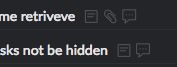
Thanks for the suggestion, we shall think about it.
Crystal, Jan 19, 2018
Hi Yanis, If you meant the “description” icon after you press Ctrl (or Alt for Mac), it is in our plan to show the description when users hover (or click) on it in the task list. What do you think?
Crystal, Jan 19, 2018