
#692: Quire Feedback
Status: Completed
How can I copy-paste a bunch of sub-tasks from one task to create a duplicate copy under another task?
Basically I have:
bug1
- investigate
- fix bug2
and I want to end up here:
bug1
- investigate
- fix bug2
- investigate
- fix
Is there a quick way to do this?
Created by Shivam Chaturvedi Nov 16, 2017
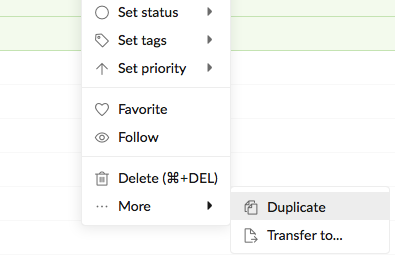
Hi Shivam, It is not available at the moment but we are considering it. 😃 For now, you can try to right-click on the selected subtasks, select Duplicate from More, and then drag & drop the subtasks to under i.e., “bug2.”
Crystal, Nov 17, 2017
What I did was create a task template. In the description I added the subtask tree (all with annotations and modifiers) and copy pasted the entire tree where I wanted!
Lázaro Guajardo, Nov 25, 2017
⭐️ We have closed this thread in order to optimize the performance of our Quire Feedback Forum.
Please see our Quire Feedback Official Guideline for more information. Thank you.
Vicky, Apr 27, 2021