
In the case of a task/project going past the due date; is there a way to add a new task/project completion date while keeping the original date? This would help us to easily gauge how often we are going over and hone our project estimating times for new task/projects.
Hi Anthony, Let’s say you have a task with a due date of 8/4, and you change it to 8/31. You can click on Created by Crystal… to see how often you miss the deadline:
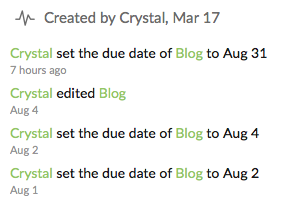
Hope it helps. 😃
Crystal, Aug 23, 2017
⭐️ We have closed your thread in order to optimize the performance of the Quire Feedback Forum. Please see our Quire Feedback Official Guideline for more information.
Peggy, Apr 28, 2021
I guess I am asking for clarification between the fields Start, Due, and Started.
Anthony Glass, Aug 24, 2017
Hi Anthony, Start date is the date you schedule to start working on a task; Started date is the actual date you started working on a task (= the date you change its status to In Progress); Due date is the date you schedule a task to be completed by. Hope this is clear. 😃
Crystal, Aug 24, 2017
This does help a little however we will want to easily track this in a spreadsheet/csv which I think the export file provides. However, after downloading the file I now have another question. How to I add a start date. For the project that is in progress, there is still not start date. See attached image for details.
Anthony Glass, Aug 24, 2017