
Another "just some feedback" 😃
When adding an assignee, the behaviour differs when adding a second assignee vs a third or more.
From within a task without assigned persons, add an assignee. This assignee is then selected. When you select another assignee, the first one will be replaced instead of the second one being added to that task.
From a task with 2 or more assigned persons, add an assignee. You will see the cursor stand to the right of the second assignee. Now a new person will be added to the task instead of replacing another assignee.
Ivo
⭐️ We have closed your thread in order to optimize the performance of the Quire Feedback Forum. Please see our Quire Feedback Official Guideline for more information.
Vicky, Apr 22, 2021
Awesome! Am I correct that the contact is still selected if you try to add new persons in an existing task?
Ivo Meisen, Aug 22, 2017
Hi Ivo, We ‘replace’ the assignee of a task when there is only one as most users usually just assign one member to a task. That said, we are thinking about adding an option for users who are more likely to add multiple assignees. That is, once they check this option, they can 'add' a member to a task every time they tap on the member by default. It should help. 😃
Crystal, Aug 16, 2017
Second picture is the expected behaviour.
Ivo Meisen, Aug 15, 2017
Hi Ivo, Let's say you have a task with one assignee. Then, after you check the "Multiple assignees" option, the cursor will stand to the right of this assignee when you try to add more members to it.
Crystal, Aug 22, 2017
Hi Ivo, Now, after you check the "Multiple assignees" option in a project’s Settings -> Options in the web app, you will be able to add multiple assignees each time you assign a task in the new version (v1.25) of the iOS app.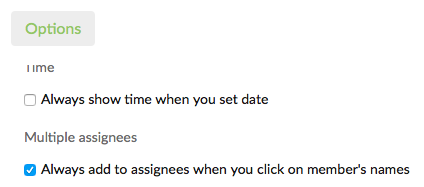 That is, the cursor will always stand to the right of the first assignee (like in your second image). 😃
Crystal, Aug 21, 2017