
Steps to reproduce:
- Open test project and sort by date. #{testpoject/22} C
- Mark a parent task "C" as completed
- Result: it completes sub-task "C1" as well, but I didn't noticed it because C1 was in another section.
- Expected:
- Option 1 - do not complete sub-tasks
- Option 2 - ask user before if all subtasks should be completed, provide option to review their details
- Option 3 - complete and notify user that all subtasks have been completed, provide option to review their details
- Option X - may be there is a better solution, I'll leave it with you guys 😃
⭐️ We have closed this thread in order to optimize the performance of our Quire Feedback Forum.
Please see our Quire Feedback Official Guideline for more information. Thank you.
Peggy, Apr 22, 2021
+1 What about the option not to be able to complete the main tasks as long as there are not completed subtasks.
Ivo Meisen, Jun 30, 2017
Hi Ivo, I think it is similar (or can be combined with) Option 2 @diego.softcontrol suggested. 😃
Crystal, Jun 30, 2017
What about mobile version?
Diego Softcontrol, Sep 14, 2017
Hi Diego, Good question. Do let us think about it along with your suggestions. Thanks! 👍
Crystal, Jun 27, 2017
Option 4. Hide comletion button for parent tasks, untill all sub tasks comleted. And this option can be set in project settings.
Option 5. Same as option 4, but don't hide the button. When clicked - open a new tab with list of all uncompleted subtasks (Zoom-In to parent task with uncompleted to-do's filter)
PS: on desktop I click 'Complete' faster than I read the tool-tip.
Diego Softcontrol, Sep 15, 2017
Hi Diego, Good question. Got any suggestion? Perhaps a dialogue after you tab on the complete icon? Though it could be annoying for some if not many.
Crystal, Sep 15, 2017
Hi guys, We have added a hint to help users know they will complete more than just the task, when they hover its complete icon. It should help. 😃
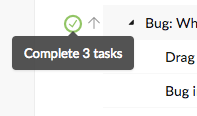
Crystal, Sep 14, 2017
Hi Diego, Thank you for the suggestions. We will consider them.
Crystal, Sep 18, 2017