
My calendar subscriptions often show an indicator that they are unable to sync. In the app BusyCal, it reports: "Unable to connect to https://quire.io/r/ical/ and the Quire calendar ID string"
What to do please?
Hi Mark, Great. You are welcome. 😃
Crystal, Jun 27, 2017
Hi Mark, I tried to sync to the BusyCal calendar and was successful. 😞 Please let me double check what you did. First, you click on "Sync" in a project's Settings view and under the Options tab.
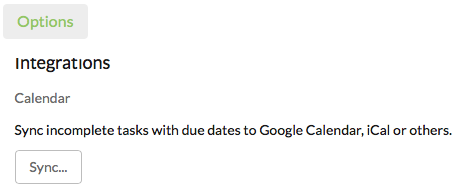
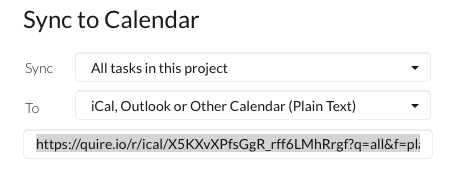
Next, you choose "iCal, Outlook or Other Calendar" and copy the link generated. Note that you must copy the "ENTIRE" link (aka including the id after ical/).
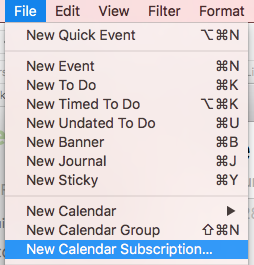
Then, you go to the BusyCal app and click on "New Calendar Subscription" under File.
You paste the link in the Calendar URL field and then click on Subscribe.
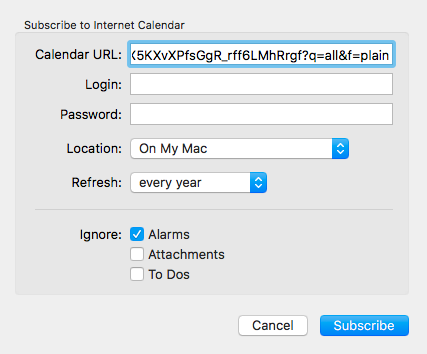
Are these the steps you took? And did the error message "Unable to connect to https://quire.io/r/ical/ and the Quire calendar ID string" appear after you click on Subscribe?
Crystal, Jun 27, 2017
Next, you choose "iCal, Outlook or Other Calendar" and copy the link generated. Note that you must copy the "ENTIRE" link (aka including the id after ical/). I have always used the full link, yes.
Interestingly, it seems to work if I don't use the keyboard shortcut command-R to refresh them all ... If I select an individual calendar and ctrl-click and select 'refresh' there is no error.
So I guess things are okay ... Much thanks.
(deleted-LqZz), Jun 27, 2017