
#448: Quire Feedback
Status: Completed
Was missing that
Created by dse Jun 23, 2017, Edited Sep 24, 2019
Hi Brian, We hear you and will change Undo shortcut to Ctrl+Z, which is originally for "Zoom in" and so zoom in will have a new shortcut Ctrl+I. 😃
Crystal, Jun 23, 2017
I expected ctrl Z to be undo (like it is in most applications). I would consider changing that shortcut. Undo / Redo is typically ctrl Z and ctrl Y
Brian Mortus, Jun 23, 2017
Hi dse, You will see a list of keyboard shortcuts after you click on the "?" icon in the bottom-right and select Keyboard Shortcuts.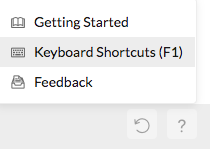
The keyboard shortcuts for "complete" a task is Ctrl+/ (or Cmd+/ for Mac) and for "undo" is Ctrl+U (or Cmd+U for Mac). By the way, did you have trouble finding the Help (?) icon?
Crystal, Jun 23, 2017