
I have used quire on a limited basis for several years and like the simplicity, the look, and the price. There are just a few things that keep me from embracing it whole heartedly and using it with my staff. One is that I try to make all project lists the complete list of information pertaining to that project. I want to include all relevant docs, contact information for relevant people, and even a record of communications. I realize all that is possible under the current structure, but if I use quire for all of this, I cannot use the progress reports that are shown because the incomplete tasks reflects items that I don't intend to be tasks. Is it possible to have a checkbox in the description that notes that the entry is a list entry and not a task? To improve upon that, would it be possible to give a couple of options like a contact listing or a project-level document, etc.?
Thanks for considering my suggestion.
Just found this by accident and really interesting, as I've used Asana in this way in the past (but not faced the reporting issue).
In fact, I'm lready using it to hold meeting agendas. My immediate solution is to not assign agenda items to anyone - although using Asana in the past I would make agenda items actual tasks (but here it was possible to have the tasks show under the meeting/agenda projects AND as tasks in the related ACTUAL / doing project (if that makes sense).
Either way, did anything ever come of this?
Thanks.
Neil Hart, Jul 9, 2021
Hi Peggy. Initially it's the same as the original post, i.e. the option to mark items as not tasks (e.g. where more for broader strategic planning/scoping or agenda setting and note taking such as in meetings) so they don't appear in My Tasks (as set by me, even if unassigned). The second point would be to have 'action' items in any of the above areas remain set as actual tasks BUT co-locate inside an actual project. Does that make sense? Thanks.
Neil Hart, Jul 20, 2021
Hi Keith and Filip, Thank you for the genuine feedback and suggestion! 😃 There are actually a few things we have been planning and considering that may help solve your issue. First of all, a feature called "subproject" which can be added as a folder (category) of your tasks in a project. Or, like a section in the project. We have also been considering a checkbox option for you to disable description, assignee, tag, etc., for tasks so they can be added as entries (items) instead of tasks. One other thing that is on our mind is to have an "outline" (draft) view where you can simply add your ideas, notes and entries here, while the already-existing "task tree" view is for those that are broken down into actions (aka tasks). What do you think? Would love to hear more about your thoughts! 😃
Crystal, Jun 15, 2017
I think that the outline view/list view would be a good way to address it. I used Toodledo previously and really liked being able to keep separate lists and outlines--leaving the tasks to the task manager. But in that program, the lists were separate from the tasks and you had to change screens, etc. Is it possible to have these views within the project itself? That would be so helpful to be able to toggle views of tasks, lists, outline, and maybe even a free form text area that supports markup. That would add lots of possible uses for the individual project.
Keith Morris, Jun 15, 2017
Hi Keith, Great! Yes, the way we imagine it at the moment is to have such an "outline" view, along with all the other views like "task tree" view and in the future "calendar" view, in each project, and you can easily toggle (switch) between the views. 😃
Crystal, Jun 15, 2017
Correct on both counts - thanks! 😃
Neil Hart, Aug 13, 2021
Hi Brian, Thank you for the suggestions. Perhaps you can give us a mockup screenshot of your approach (from a programming perspective)? 😃
Crystal, Jun 20, 2017
Crystal, I just reread your checkbox option- and that's pretty much what I'm suggesting- but I wouldn't want it to disable description, or tagging, commenting or anything.
Brian Mortus, Jun 20, 2017
Hi All ! I'm a new comer testing Quire for the very first time. First I would like to congratulate all the Quire team for this awesome software and this very interesting approach in terms of projects management ! At first sight, the only feature missing for me is the one perfectly mentionned in this post by Keith. Is there something new since 2017 please ? Many thanks in advance, Serge
Serge Berrard, Jun 16, 2019
Hi Brian, This is great. 👍 We will take it into consideration. Thanks!
Crystal, Jun 21, 2017
I was thinking of a different to approach this. The outline view is a good idea in my opinion, but wouldn't necessarily solve the issue. For example- if you are creating list of references. You'd never check those tasks off. They'd never be completed and would throw off reporting. I think if you could mark a "parent" task as "do not track" or something like that it might not be too complicated- though you'd have to mark all subtasks as "do not track" as well. From a programming perspective, I'm thinking that it would require adding a boolean field to the "task" that would mark it as "do not track". From a UI perspective- you could Italicize the non-tasks perhaps to differentiate them from the "tracked" tasks.
Brian Mortus, Jun 20, 2017
Hi Neil - I would like to help and share some of my ideas. However, I don't quite understand the issue you are facing here. Could you please explain more clearly in example what kind of feature are you looking for and what do you expect to see? Thanks! 😭
Peggy, Jul 20, 2021
Hi Neil -
Initially it's the same as the original post, i.e. the option to mark items as not tasks (e.g. where more for broader strategic planning/scoping or agenda setting and note taking such as in meetings) so they don't appear in My Tasks (as set by me, even if unassigned).
I think what you are requesting here is kind of like a header/section feature, which has been brought up by other users as well in this thread #1858. You may refer to that thread for more updates from us.
The second point would be to have 'action' items in any of the above areas remain set as actual tasks BUT co-locate inside an actual project. Does that make sense? Thanks.
This sounds like you are looking for a way to create a syncing task and this task can be copied and pasted to different project, so when you update the task in Project A, the task will also update automatically in Project B. A thread in Quire Feedback forum with the related topic: #3247. You may refer to that thread for more updates from us if any. Thanks!
Peggy, Aug 12, 2021
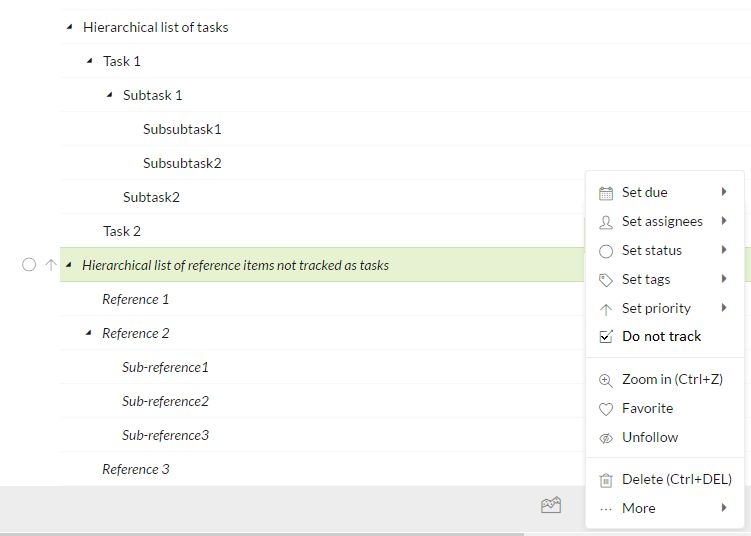 Just a quick mockup- best I could do with a couple minutes, MS Paint and the snipping tool 😃
Brian Mortus, Jun 20, 2017
I was thinking a similar thing recently. Tasks vs folders is Not an easy problem so solve, but if it's done elegantly, it would be great!
Maybe treat quire more like an outliner, and only count something as a task either when denoted as a task (write [ ] at the beginning to be markdown compatible) OR when it's assigned to someone or has priority etc... intriguing.
filip, Jun 15, 2017