
Bom dia,
primeiro gostaria de parabenizá-los pelo excelente software.
Observando algumas funcionalidades achei oportuno entrar e contato e enviar uma sugestão.
- O Task Status poderia ser ajustável, exemplo, poderia acrescentar novos status, como In Test.
- Na área de comentário utilizando o # é possível visualizar o número da tarefa, eu acredito que seria muito interessante que esse id da tarefa também fosse visto na linha de cada tarefa, na área onde estão todas as tarefas.
Como disse são apenas sugestões, mas o software é muito bom, estou muito satisfeito.
Obrigado.
It worked.
Thank you very much.
Rafaeldiasunisistema, May 24, 2017
⭐️ We have closed your thread in order to optimize the performance of the Quire Feedback Forum. Please see our Quire Feedback Official Guideline for more information.
Peggy, Apr 20, 2021
Hi Rafael, I see why now! I am super sorry. My bad. It should be Ctrl (Alt is for Mac). Please try press Ctrl this time, and let me know if it works. Thanks a lot!
Crystal, May 24, 2017
No problem. Thank you so much for your patience. 😃
Crystal, May 24, 2017
Hi Rafael, With the help of Google Translate, I was able to read your suggestions but please do correct me if I have mistaken them. 😃 You will be able to add your own statuses in the future when we introduce the "kanban" view. For example, you can add a new board/column and name it In Test. As for seeing task ID in thee "tree" (task list) view, simply press Alt. Hope these help. 😃 By the way, can you share why you need to use a software like Quire, and what you like most about it?
Crystal, May 22, 2017
100 and 101 would be the id of every task
Rafaeldiasunisistema, May 23, 2017
I did not make it. I'll keep trying.
Thank you very much.
Rafaeldiasunisistema, May 24, 2017
Hello.
Thanks for listening.
About status Ok.
About ID would look something like: Example, when registering tasks:
Task 1 and Task 2
It would be shown in the task list automatically:
100 task 1
101 task 2
thank you.
Rafaeldiasunisistema, May 23, 2017
Hi Rafael,
You are welcome. 😃
Did you try pressing Alt in Quire? After you press Alt, your task list shall look something like this with task IDs on the right:
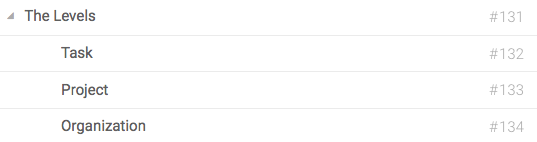
And we will also show task ID in the upper-left of each task's description:
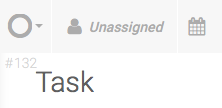
Hope these help. 😃
Crystal, May 24, 2017
See my example, does not appear even if using Alt.
thank you
Rafaeldiasunisistema, May 24, 2017