
notifications not working for me. I cannot seem to trigger an alert so it appears as a pop up on the screen like in clock.app.
I have checked settings>quire.ap> Notifications on
I have also deleted the app and reinstall it
I am on IOS 10.2.1 iphone
I get no alerts showing in notifications. The way im thinking about it is like this:- i set a task titled "phone dentist" with a due time of 10:00. When the time reaches 10:00 then my phone vibrates or makes a alert sound, when i look at my phone the alert is on the locked screen saying "phone dentist"...can quire do that?
wayne alexander, Feb 3, 2017
Yes, notifications you see in Quire's web app will appear in the iOS app's notification center.
Crystal, Feb 2, 2017
Is there a way to change the notification sound?
Ben Thompson, May 21, 2018
Can notifications appear in the ios notificatiobs ??
wayne alexander, Feb 2, 2017
Yes. First, please make sure everything is toggled on in Settings > Notifications > Quire of your iPhone:
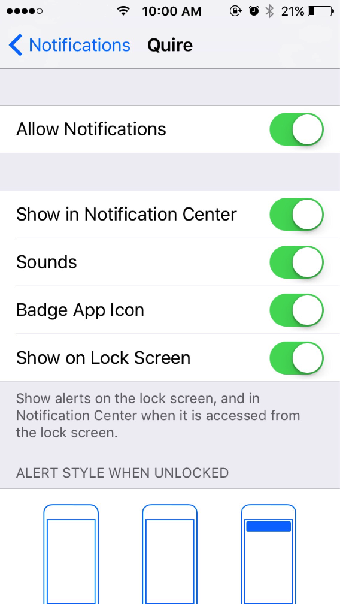
Then, make sure you have set Remind Upcoming Time to "At the time" in your Account Settings:
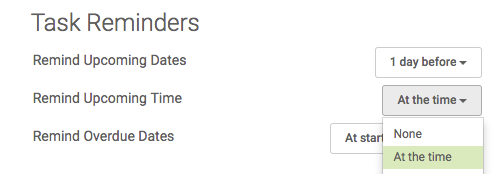
After you have done so, you should be able to receive push notification of your task with a due time of let's say 09:33 at 09:33 on your locked screen:
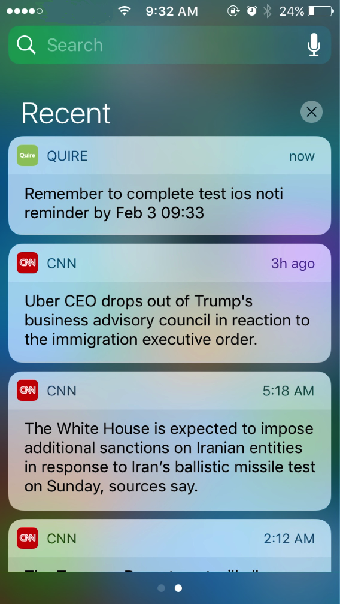
P.S. Be sure your iPhone is connected to the Internet.
Crystal, Feb 3, 2017
Hi Wayne, Can you explain a bit more about "so it appears as a pop up on the screen"? Best if you could provide us with a screenshot of what you see. Thanks a lot!
Crystal, Feb 1, 2017
⭐️ We have closed this thread in order to optimize the performance of our Quire Feedback Forum.
Please see our Quire Feedback Official Guideline for more information.
If your request/feedback wasn’t answered, please leave a comment below, so the Quire team will be notified and we will reopen this thread again. Thank you.
Peggy, Apr 22, 2021