
The selected task is actually a sub-task in the third level. In the overview of my tasks this can only be seen in the extended view (Ctrl). I would like to be able to navigate quickly from the current view to the actual subtask in the corresponding project.
nope
(deleted-s5X_), Nov 15, 2019
Tried this one also on the web app: there is no zoom out option available, so you have no way to go to the parent task.
(deleted-IAMQ), Nov 15, 2019
Marcel, The zoom feature is your solution, right?
(deleted-OmuA), Nov 15, 2019
To me this is a design failure. Can't be the case that one needs to have two sessions open.
(deleted-IAMQ), Nov 15, 2019
I would also like this.
I would also like the opposite ability to quickly bounce to the parent task so that I can edit it.
Lacking the ability to quickly jump to AND EDIT a parent or child task, is frustrating.
How is the Quire dev team not frustrated with their own software's inability to do this?!?
The zoom feature is fine but it a few things kill it's functionality, making it NOT A SOLUTION.
1] once "zoomed in" you can't see the tasks there because there is a filter enabled. Zooming in should AUTOMATICALLY CLEAR ALL FILTERS for the temporary time you are zoomed otherwise it is useless. (Recently a drop down has been added "other tasks". This solves this problem.
2] once zoomed in you cannot edit The parent task. Even zooming to the top level (not zooming out) you are unable to edit the parent. I actually have to get out of that project folder and go hunting for the parent just to make a quick change and then try to come back to that workflow totally and completely breaking the whole workflow.
(deleted-OmuA), Nov 15, 2019
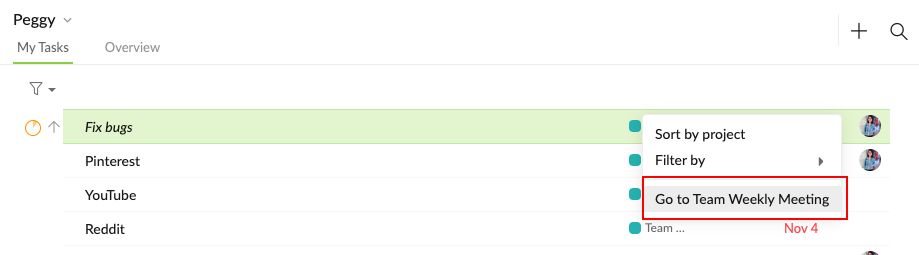
in my screenshot you can clearly see that this is the browser version. I am also in the new My Tasks section. There only the subtask is shown to me. From there I would like to be able to navigate directly to the main task. Or navigate to the project where the task is located. Then it should ideally be marked directly.
(deleted-s5X_), Nov 15, 2019