
@joshuarobison.biz Correct, due dates and notifications are not the same. Just like in (sorry for mentioning it again😉) Todoist. As an example I have a 'Check Waiting For list' task, which should recur each day at 16:00. I could set multiple notifications, like minutes before due date/time and 10 minutes after. Once I complete the task it next recurrence should be set to the next day again at 16:00 with the same notifications. On the other hand I have a task called 'Replace contact lenses'. This should recur every 30 days after completion date. In case I would have a notification set at, let's say, 07:00, the notification should be set at that new date.
(deleted-IAMQ), Oct 27, 2019
In simple words recur from the date/time of completion, or recur from the original planned date/time. This is how you can set recurring tasks in Todoist (super flexible) https://get.todoist.help/hc/en-us/articles/360000636289-Set-a-recurring-due-date
(deleted-IAMQ), Oct 27, 2019
Hi @pascal.zweipfenning , I'm not quite sure how you have set up your recurring task.
If you have set your task to repeat "customized" days, and you checked "Since lastest completion", our system will create a new task with the due date/time based on the moment that you completed that task.
Hope this helps.
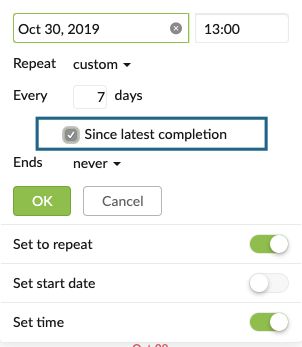
Peggy, Oct 30, 2019
@peggy Solved! I completely missed that check box. Thanks.
(deleted-IAMQ), Oct 30, 2019