
comments
Hi Lázaro, You can bookmark a public (or your own private) project by going to Recent / Projects category in the left sidebar, and clicking on the “Bookmark” icon.
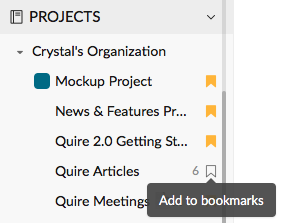
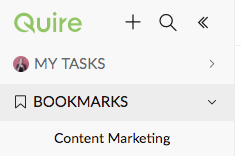
Once you bookmarked a project, it will appear under the category Bookmarks in sidebar.
Crystal, Nov 27, 2017
Hi @asta.andrea, Sorry for the late reply! It is not possible at the moment, but it will be. 😃 May I ask what sort of theme (eg. font color, background color, font size) you have in mind?
Crystal, Sep 14, 2016
Hi @kzimmerman, Yes, a calendar view and a Gantt chart are in our plan! 😃
Crystal, Aug 6, 2016
cool
(deleted-YXfF), Jul 10, 2015
Hi @joyxaviour, Here's our feedback community link: #{Quire_Feedbacks}.
Crystal, Jul 5, 2016
Are there any plans to add a calendar view of tasks? A Gantt chart? Thanks!
Karen Zimmerman, Aug 6, 2016
cool
Ash, Mar 4, 2016
Hi @fabio.chagas.mail You can log off by going to your profile icon on the upper-right of your screen and clicking on "Log out". Try it and let me know if you still have trouble logging out.
Crystal, Jul 21, 2015
Hi Lázaro, Please tell us your OS (eg. Windows 10) and browser and its version (eg., Chrome) to help us look into it. Also, please let us know if you see the Recent category in the sidebar, after you click on a few of your own projects. If the Recent category appears, close the browser and open it to go to Quire again. And let us know if you see Recent now. Fyi, only your projects (not public projects like Getting Started) will appear under Recent.
Note: Only when you hover a "project" in the sidebar will you see the option to bookmark it.
Crystal, Dec 1, 2017
Hi Crystal, That's great news! The best feature of Quire is the ability to share a project with an URL without the person you are sharing it with being forced to sign up! I don't know any other platform that does that. When faced with a sign up page, some clients would find this off putting, so it's a really good feature!
spilsburydesign, May 11, 2017
Hi Rajesh,
a means to capture hours spent across days on a task.
For example, you want to capture & see how much time you spent on a task yesterday (eg., 2 hours) and today (eg., 1.5 hours)?
What we are thinking is a stopwatch with Start, Pause and Resume, and a “field” for each task where you can enter the time spent.
Crystal, Jan 30, 2018
Also - is there any way to export tasks to excel? I would mainly use this do internal schedules, but I need to be able to export and make modifications before the schedule can go to the clients.. Thanks.
Karen Zimmerman, Aug 6, 2016
Hi @savalifetoday,
Currently, printing off all of your tasks in one project is available, but all projects (in an organization) at one time is not. That said, we shall consider it. May I ask why you would need to do so?
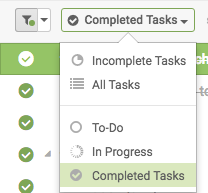
To see the tasks you have completed in a project, click on the filter icon in the top menu bar, and choose Completed Tasks after clicking on "Incomplete Tasks" (or another view you have chosen). Let me know if it helps, thanks!
Crystal, Sep 5, 2016
Hi, when can we expect a time tracking or logging feature for tasks. I am thinking of adding subtasks to a task with description with start and end date ... I wish there is a cleaner way to do this
Rajesh GS, Jan 17, 2018
Hi Rajesh, A timer (stopwatch) is in our plan but no release date for it yet. And we are considering to add a “field” in the task list for users to log time (or other value like cost) to each task. Are these what you need?
Crystal, Jan 19, 2018
Hi spilsburydesign, Happy to hear you love Quire! 😃 What do you enjoy the most about the app so far? Guess what, we will introduce a "timer" feature in the future, and it shall do exactly what you just said. Once it is available, we will notify you. 😃
Crystal, May 11, 2017
@crystal - not a stopwatch feature per se. but a means to capture hours spent across days on a task. total time spent is good to calculate the entire hours spent on the task. how can we compute the time spent daily on a task?
Rajesh GS, Jan 29, 2018
Do you have any audible reminder notification for mobile apps.
SDC, Jan 9, 2020
Also, where do I find the tasks I have clicked as completed? I am hoping there is list of completed tasks hanging around somewhere. Thanks!
Savalifetoday, Sep 2, 2016
how do I get started. there is no instructions on what to do?
Darren Bennetts, Jan 16, 2019
Hi Rodrigo, Not at the moment. May I ask why you were asking?
Crystal, Nov 21, 2016
Do you have API access?
(deleted-LUQ_), Nov 21, 2016
Hi! Is there a way to print off all of my projects at one time, including the tasks?
Savalifetoday, Sep 2, 2016
how do you add this as a project
Dr. Marion Mouton, Nov 16, 2018
Hi @kzimmerman, Here's how you can add multiple members to a task: #3 Assign a task to you... No, you don't need to create teams for your "internal members" (aka your project members and organization members). Right now, only "external members" have to be in "teams". In other words, when you assign a task to external members, you need to give them a team name. Is this a concern for you?
Crystal, Aug 13, 2016
I was trying to do that but it doesn't show up so I can bookmark it.
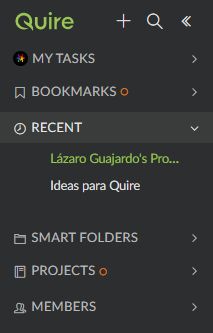
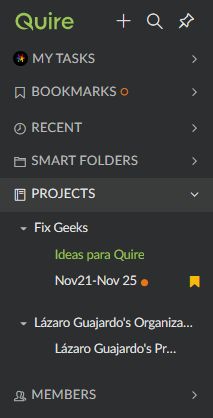
Also, sometimes the Recent Section on the sidebar shows up sometimes it doesn't. And when it does, the project Getting Started with Quire doesn't appear on the list.
Lázaro Guajardo, Nov 27, 2017
Hi Phoenix, Did you set start or due time to the tasks before you sync? Let’s say you set due time 3/13 5PM to tasks, and you and your friend from Japan sync them to Google Calendar. Then, you will see 3/13 5PM in the calendar, and your friend will see 3/14 6AM in the calendar. If your friend just add due date 3/13 to tasks, and both of you sync them to calendar, then you guys will see the same due date 3/13 in the calendar. In short, if tasks have time, you will see them differently as they are based on your local time zone. If tasks just have date, you will see the same date as your friend as he/she is the one who set the date. Hope this helps. 😃
Crystal, Mar 10, 2017
Hi There, Is there a way to limit projects to certain members instead of all members in the team?
Ahmed Balfaqih, Sep 16, 2016
Hi @eboarder1 Glad you like it! Please feel free to drop us any question or feedback any time you like. 😃
Crystal, Jul 10, 2015
@crystal please send the Feedback listing page link
Joy Xaviour, Jul 4, 2016
Please, how do I log off properly from Quire?
Fabio Chagas, Jul 21, 2015
Will I have to create internal teams as external teams?
Karen Zimmerman, Aug 13, 2016
Hi @prmartinezmartin , Welcome abroad! And thanks for the kind words! It means a lot to our team! Feel free to give us any suggestions you have, so we can make Quire better!
Peggy, Apr 23, 2019
Hi! I'm loving Quire so far! Is there a time tracker? (One you can start, pause and end, and will track hours and minutes?)
spilsburydesign, May 11, 2017
Hi, is there a way to change the theme?
Andrea Asta, Sep 10, 2016
Hi Crystal! Is there a way to bookmark this and other public projects? I can´t seem to find the option.
Lázaro Guajardo, Nov 27, 2017
Hi @sdc.imp , please make sure you turned on the sound notifications for the Quire app on your phone.
Peggy, Jan 10, 2020
Hi! I integrated Quire with my Google Calendar, but the time zone on the integrated calendar shows my time as GMT only, not +6 hours to synch with Central time. How do I update the time zone to reflect my location?
Phoenix, Mar 10, 2017
@sdc.imp I've found on Android that the notifications will not be pushed when the app is open. Rather, the notification icon in-app will be highlighted and the count increased by one. Took us a bit to figure that out.
::k::, Jan 21, 2020
Hey. Is there any update available on the plan to add a calendar view of tasks or Gantt view? Thanks!
Kevin Oreilly, Mar 30, 2017
Peggy, Feb 27, 2019
Okay, I found out how to add members. How do I add multiple members to a task? We have creative teams that work together to deliver on tasks. Thanks!
Karen Zimmerman, Aug 13, 2016
Hi Dr. Marion, I am assuming you would like to see Getting Started Guide in the left sidebar? To help us better understand your question, could you provide an example of what you meant by "add this as a project"? Thanks!
Michelle, Nov 16, 2018
Hi, justo downloaded the app and went through the basic guide reading all your comments. I have to congrats you for how polite and usually fast and patient you are with all the users. I'll let you know if I have any problems guys and thank you!
Pedro Martínez Martín, Apr 22, 2019
Hi Kevin, A native calendar view of tasks is already on our list of to-dos for the upcoming Quire 2.0, but possibly at a later stage of ver. 2. Once it is available, we will let you know. 😃 May I ask why you need such a calendar (or Gantt) view?
Crystal, Mar 31, 2017