TL;DR · Quick verdict
Which free Asana alternative should you pick?
If you only have 30 seconds, here is the short version of why teams leave Asana for Quire, and how the migration works.
If you’ve outgrown Asana — its flat task list, its single-assignee model, or its free-tier limits — you’re not alone. This page covers why teams switch to Quire as a free Asana alternative, and how the migration takes only four steps.
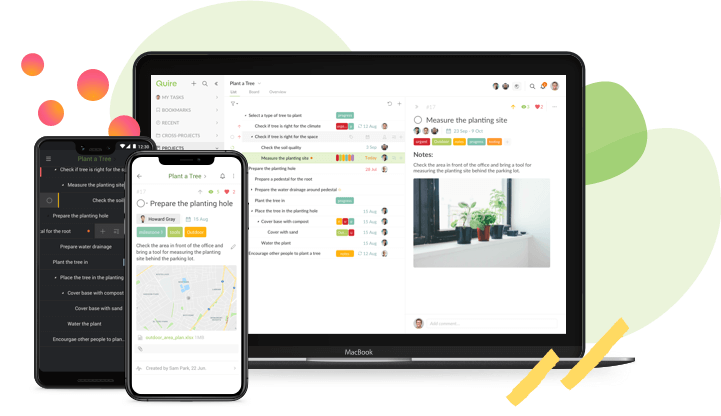
Let’s be honest: no project management tool is perfect, Asana included. But if you want something more straightforward without losing the structure your work needs, you’ve come to the right place. Quire’s signature combo is an infinite nested task list plus a Kanban board over the same data, switchable anytime.
Quire isn’t a stripped-down Asana clone. It’s a different take on project management: gather ideas in a nested tree, focus on what matters this week with Kanban or Timeline, and share ownership with true multiple assignees — all on a free plan that doesn’t shrink as your team grows.
Built on our philosophy that real project management is nested tasks meeting Kanban, Quire keeps the planning surface light so your team spends time doing the work, not configuring the tool. Whatever pushed you out of Asana, your projects are in good hands now.
Why is Quire the best alternative to Asana?

A simple, elegant interface is what Quire users praise most. We’ve spent years balancing power with simplicity, so your team can start running real projects on day one — not spend the first month learning where every button lives.

Nested task list is Quire’s signature feature: break big ideas into smaller, doable subtasks with no depth limit. Unlike Asana’s
flat to-do list with sections, Quire’s hierarchical tree lets you organize work the way your mind already maps it — goals at the top, concrete actions at the bottom.

Kanban board lets you visualize work-in-progress by pulling the tasks that matter this week onto the board. Unlike Asana — which asks you to commit a project to either list or board view — Quire lets you
switch between Tree and Board over the same data, with no duplication and no re-keying.

Sublist is a unique approach that sets Quire apart from other Asana alternatives. Within a single project, create as many sublists as you need to focus on what matters most. If you’re used to Asana’s sections, Quire Sublist is a major step up — sublists slice, group, and filter dynamically instead of being fixed dividers.

Timeline is a simple Gantt chart that maps out team schedules visually. For the same task list, switch freely between Tree, Board, and Timeline — all three views render the same underlying data, so you never have to maintain a separate schedule.

Permission control lets you set up
external teams that only see the tasks assigned to them — the rest of the project stays private. You can also
share read-only links with clients so they can view a project or task without signing up for a Quire account.
Plenty more features are waiting to be explored — multiple assignees, Siri activation, Smart Folder, Zoom In, and more. Ready to try Quire?
An Easy and Fast Process to Migrate Your Projects from Asana
Switching tools is uncomfortable, but the Asana→Quire migration takes about five minutes. Here’s how to move your data — fast, simple, and pain-free.
-
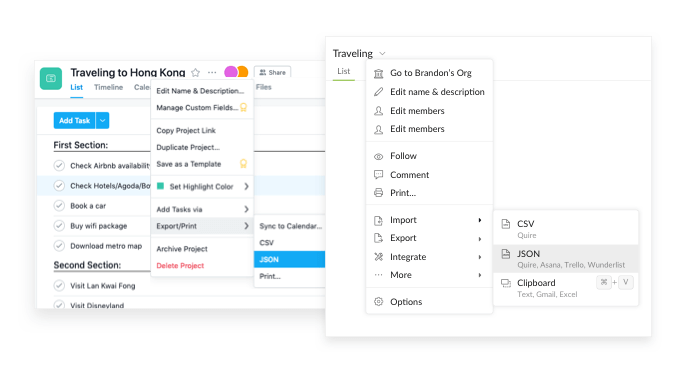
- Export your Asana project as a JSON file from the web browser and save it locally.
- Create a new project in Quire.
- Click the dropdown next to your new project’s name to open the import menu.
- Import your local Asana JSON file.
Your Asana projects are now in Quire — same hierarchy, same descriptions. Pick up where you left off and enjoy working in a tool built for how your team actually plans.
Still have questions about switching from Asana? Reach out to us at [email protected].